

TM 5-3895-385-10
0015
BOLT-ON SCREED EXTENSION KIT REMOVAL -- CONTINUED.
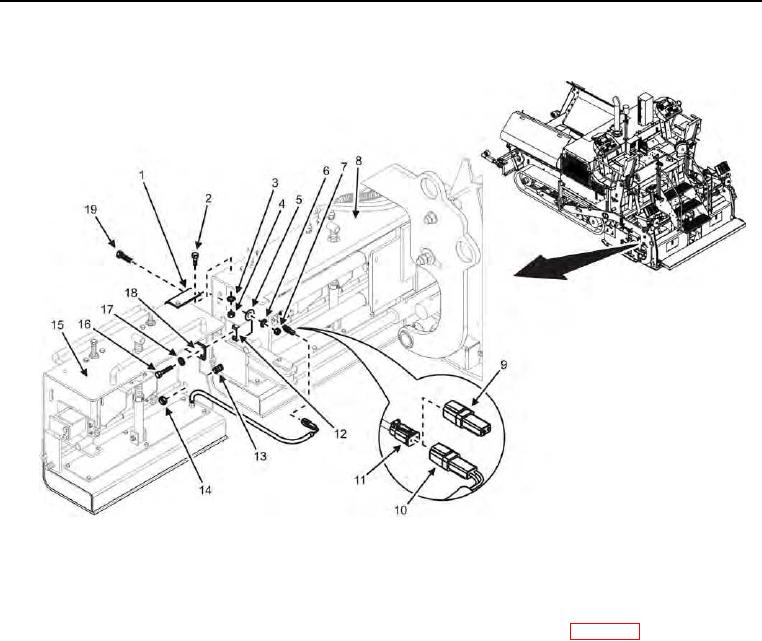
Figure 3. Bolt-On Screed Extension -- Removal.
15. Disconnect screed electric heat box element cable (Figure 3, Item 11) from bolt-on extension screed electric
heat box element cable (Figure 3, Item 10).
16. Obtain screed electric heat box element cable cap (Figure 3, Item 9) from toolbox (WP 0002), and install
screed electric heat box element cable cap onto screed electric heat box element cable (Figure 3, Item 11).
17. Remove lock nut (Figure 3, Item 14) from screed extension bolt (Figure 3, Item 13), and discard lock nut.
18. Remove two bolts (Figure 3, Item 16), lock washers (Figure 3, Item 17), and screed end gate bracket mount
bar (Figure 3, Item 18) from screed extension (Figure 3, Item 8), and discard lock washers.
19. Remove bolt (Figure 3, Item 2), lock washer (Figure 3, Item 3), and nut (Figure 3, Item 4) from screed
extension multiple angle bracket (Figure 3, Item 1), and discard lock washer.
20. Remove bolt (Figure 3, Item 19), flat washer (Figure 3, Item 5), lock washer (Figure 3, Item 6), and nut (Figure
3, Item 7) from screed extension multiple angle bracket (Figure 3, Item 1), and discard lock washer.